Import and Manipulate Results of Network and App Scanning Tools with PlexTrac
Conquer Q4 as a Security Consultant
Automated data collection is critical for security consultancies to maximize their coverage of a clients’ environments. While necessary, anyone can employ automated scanners. The value add is having the expertise to collect, triage, and provide the professional analysis of the data to truly support the client’s security strategy and the improvement of their security posture.
Providing this expertise is what security service providers do so well. And becoming more effective and efficient with data collection and analysis is the key to making your life easier when the Q4 deadlines hit.
With PlexTrac, you can import all of the data from your network and application scanning tools into one place, and manipulate and analyze those results to form the basis of findings and writeups on those findings. Bring all your data together in PlexTrac for better, quicker aggregation and visualization of your data.
A Centralized Platform for All the Things
PlexTrac supports data imports from all leading vulnerability scanners, including Nessus, Burp Suite, Nexpose, and Veracode. You can also plug and play other scanners or your custom tools with PlexTrac’s open API. And we are constantly working on new integrations!
Imagine the convenience and control of being able to deal with all your automated scanners in one place where you can import all the data from all the sources, manipulate and enhance it, and add your professional analysis. PlexTrac makes it simple to do just that.
How to Import Data from Scanners in PlexTrac
A few simple steps on our user-friendly interface and you’ll be saving time while focusing on the real security work.
Step 1: Prepare to Add Findings to a Report
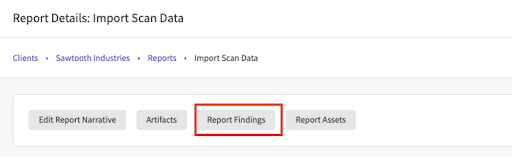
Navigate to the findings section.
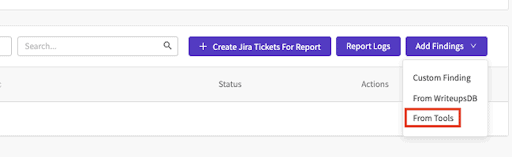
Select the “Add Findings Dropdown,” and then select the “From Tools” option.
Step 2: Choose Your Scanner Imports
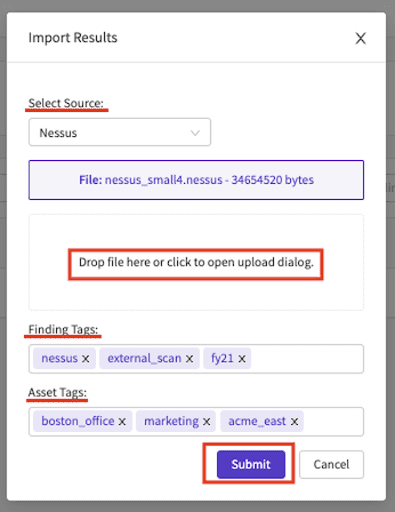
A modal titled “Import Results” will appear. From here, you will use the “Select Source” drop down and choose the tool that the data is coming from (i.e. Nessus, Burp, Qualys). Additionally, you can add tags to both the findings and the assets that are being imported.
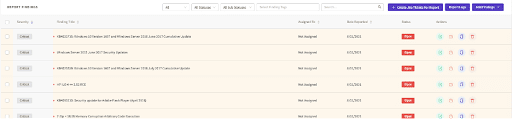
You will then see all of the scan data brought into PlexTrac in the form of “Findings.”
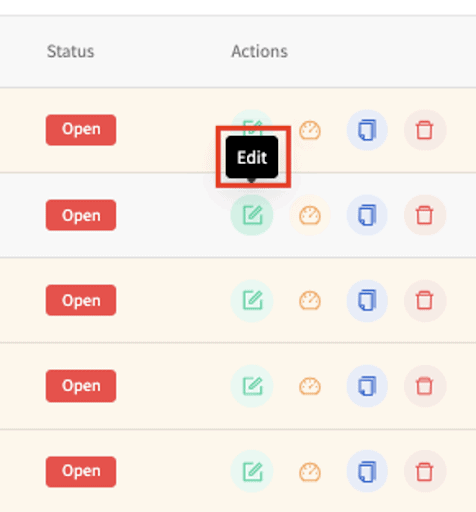
Step 3: Modify, Enhance, Analyze the Data
You will then see all of the scan data brought into PlexTrac in the form of “Findings.”
Conquer Your Automated Scanner Data with PlexTrac
Managing the data doesn’t have to be such a drag. Build better reports in half the time by importing the data from all your network and application scanning tools into PlexTrac.
The busiest time of the year can be so much better with the right partners … isn’t that what you tell your clients? Partner with PlexTrac for your security workflow management and conquer Q4 this year.
Schedule a demo today to see more!