
Export to Custom Report Templates with PlexTrac
Conquer Q4 as a Security Consultant
Preparing the actual report for clients is often one of the least popular tasks a security consultant must accomplish. The real security work is done, but now you have put it together in a document that the client can use and that represents your organization — accounting for all the branding demands of the marketing department. What if you could manage the data and prepare your report in one platform AND easily export in the look and feel you need?
PlexTrac takes you through the entire security management workflow from data aggregation to deliverable report. How will your report look like with PlexTrac? Exactly how it does now. With supported custom templating and PlexTrac’s open API, you can match your reporting methodologies and organization’s branding guidelines. Export all your report features — findings, narratives, evidence — into your custom .docx template with the click of a button with PlexTrac.
Report Templates Tailored to Your Organization
Within PlexTrac you have the ability to gather and organize all of the potential data points surrounding the security services you provide, including penetration testing, vulnerability scans, or framework-based assessments. This data likely needs to be submitted as a report.
PlexTrac streamlines report creation by allowing you to prepare the report content in the same platform where you have collected and triaged your data and applied existing and customized writeups. Once everything is ready, exporting to a document template designed to your specifications and accessible to your clients is a breeze.
Export to Customized Documents from PlexTrac
Moving from data to deliverable is completely streamlined in PlexTrac. Writing quality, consistent, branded, and beautifully formatted reports has never been simpler.
Step 1: Access All the Report Data
Prepare your data right in the platform — including narratives, analytics, screenshots, and more.
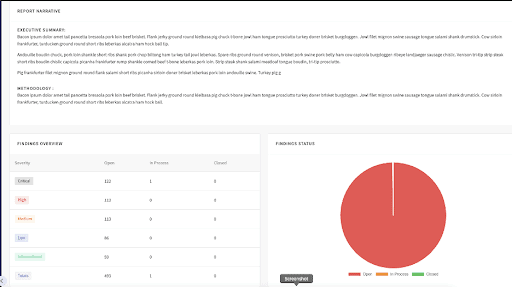
While the unique data points that service providers report on may be similar, the format in which different organizations present this data is generally very unique. Using PlexTrac’s custom report formatting, you can automate the vast majority of report generation. Allowing you to build the data out inside of PlexTrac and then simply export to Word.
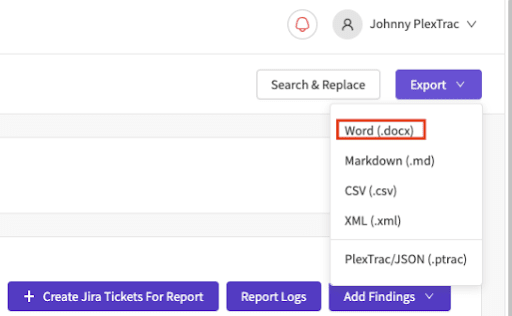
Step 2: Export to a Customize Template
Once exported, you will see a document that has all the required fonts, formats, and styles to ensure that your reports meet the standards that your organization has defined.
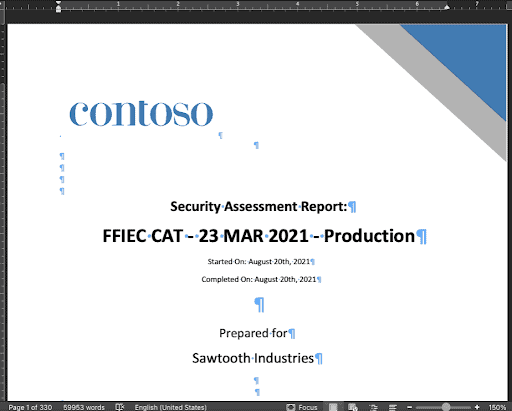
Step 3: Display the Data You Want, How You Want
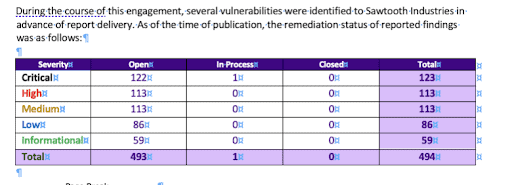
All of the unique data points within PlexTrac can be presented in the final document. Detailed findings and custom narratives are just two examples of all the potential ways to display this data.
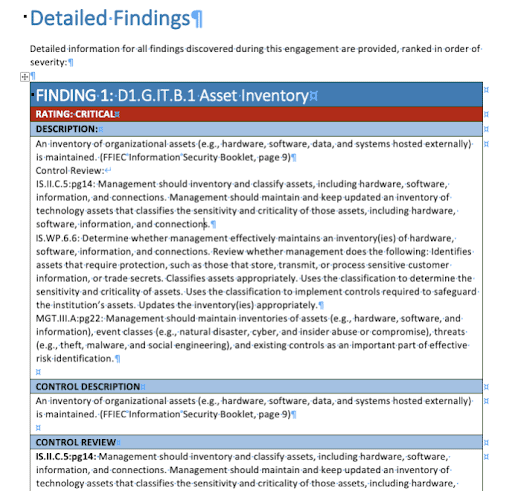
Conquer Your Reporting with Easy Exporting and Custom Templating
Why not write reports directly from the platform where you manage your data and derive your analytics? Stop wasting time copying and pasting when you can use PlexTrac to instantly export reports to a template personalized for your methodologies and brand identity.
The busiest time of the year can be so much better with the right partners … isn’t that what you tell your clients? Partner with PlexTrac for your security workflow management and conquer Q4 this year.
Schedule a demo today to see more!